Skip to content

The One Pick

  • About The One Pick
  • Privacy Policy
  • Contact
  • How We Test
  • Affiliate Disclosure

Every Feature Worked When We Put an iPad Pro on a Studio Display. We Still Needed a Trackpad.
September 20, 2026 by TK Lee
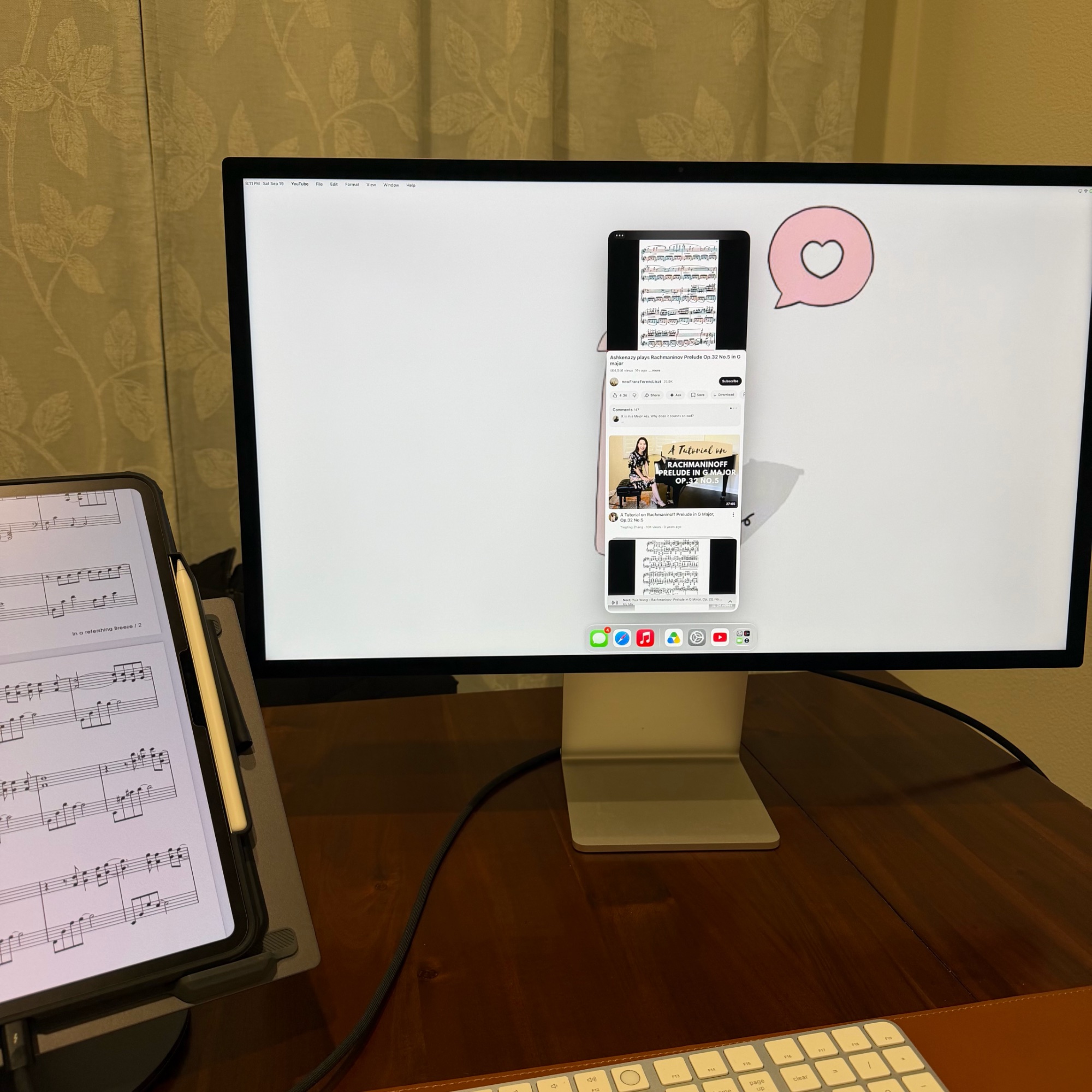
Photograph of an iPad Pro on a stand beside a Studio Display on a wooden desk. The iPad shows a page of sheet music while the Studio Display shows a separate video window with a menu bar and a dock, demonstrating two different apps running on the two screens at once.

We checked fourteen things on an iPad Pro connected to a Studio Display and could not find one that had stopped working. Then we tried to move a window.
Categories Apple

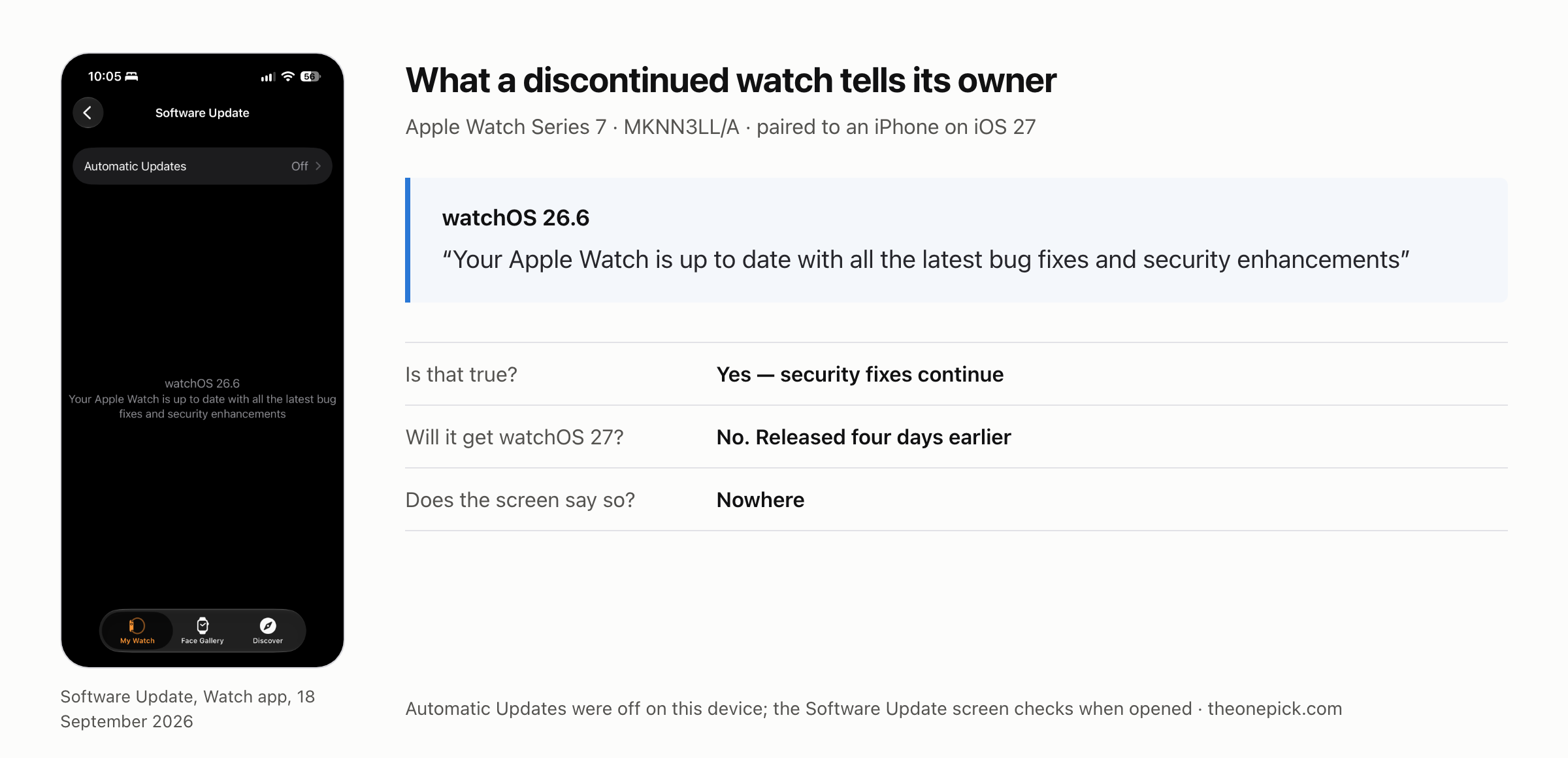
Apple Says This Watch Is Up to Date. It Will Never Get watchOS 27.

October 15, 2026September 20, 2026 by TK Lee
Screenshot of the Software Update screen in the Watch app on 18 September 2026, reading watchOS 26.6 and “Your Apple Watch is up to date with all the latest bug fixes and security enhancements”, beside a summary: the statement is true because security fixes continue, the watch will not get watchOS 27, and the screen says so nowhere.

Our Apple Watch Series 7 will never get watchOS 27. The update screen tells it that it is up to date. We checked what a dropped watch still does with a phone on iOS 27.

Categories Apple

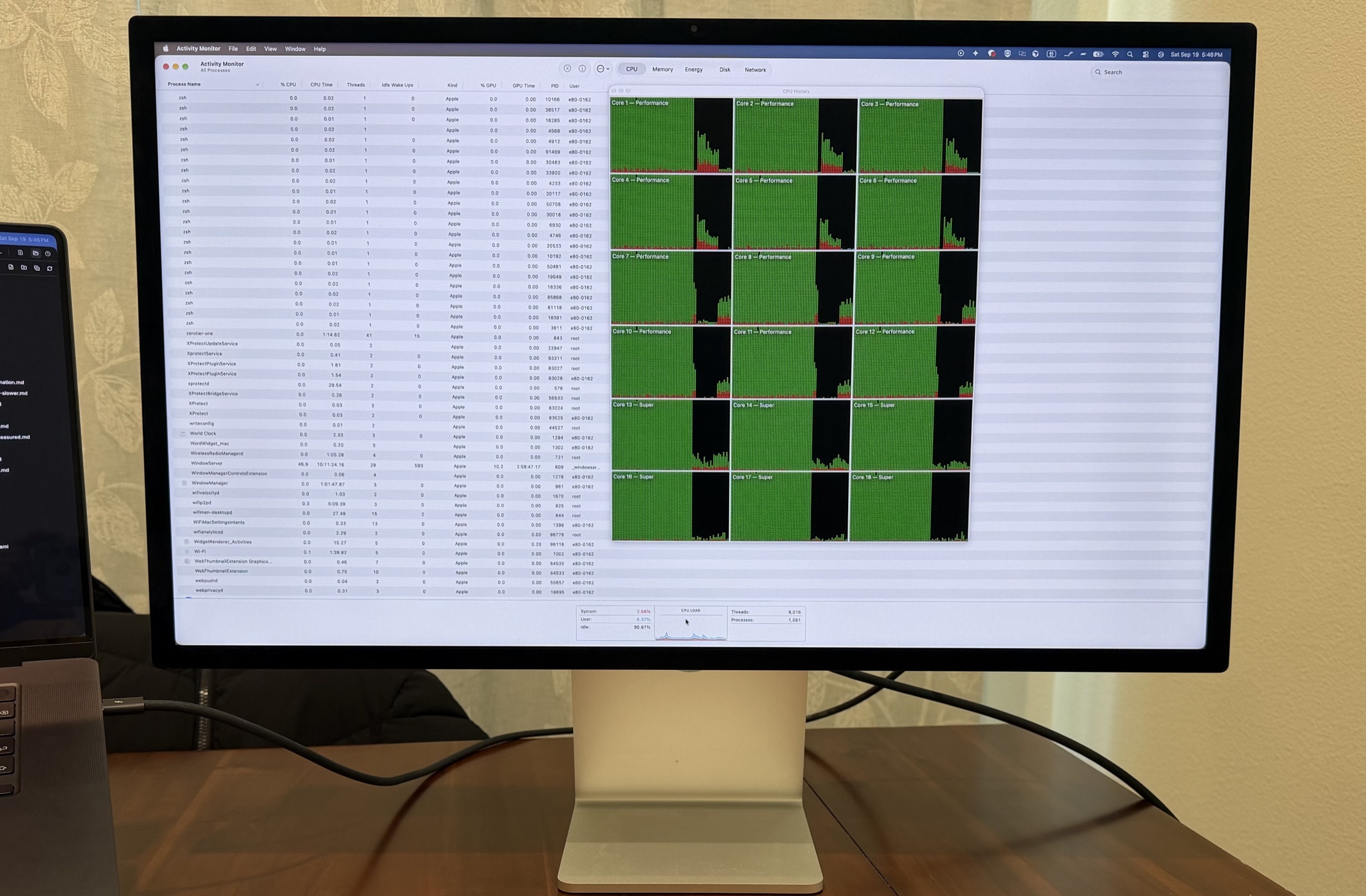
Yes, a Studio Display Charges a MacBook Pro 16 — 46% to 54% Under Load

October 16, 2026September 20, 2026 by TK Lee
Photograph of the test setup: a Studio Display on a wooden desk showing Activity Monitor with all eighteen CPU cores filled green, and a single dark cable running from behind the display into the left side of a MacBook Pro standing beside it. No power adapter is attached to the laptop.

We pulled the 140W brick, left a 16-inch MacBook Pro on the Studio Display’s cable alone, and pinned all eighteen cores for thirty minutes. The battery went up, not down.

Categories Apple

Does the Update Slow Down an Older iPhone? Ours Gained More Than the New One.

October 14, 2026September 18, 2026 by TK Lee
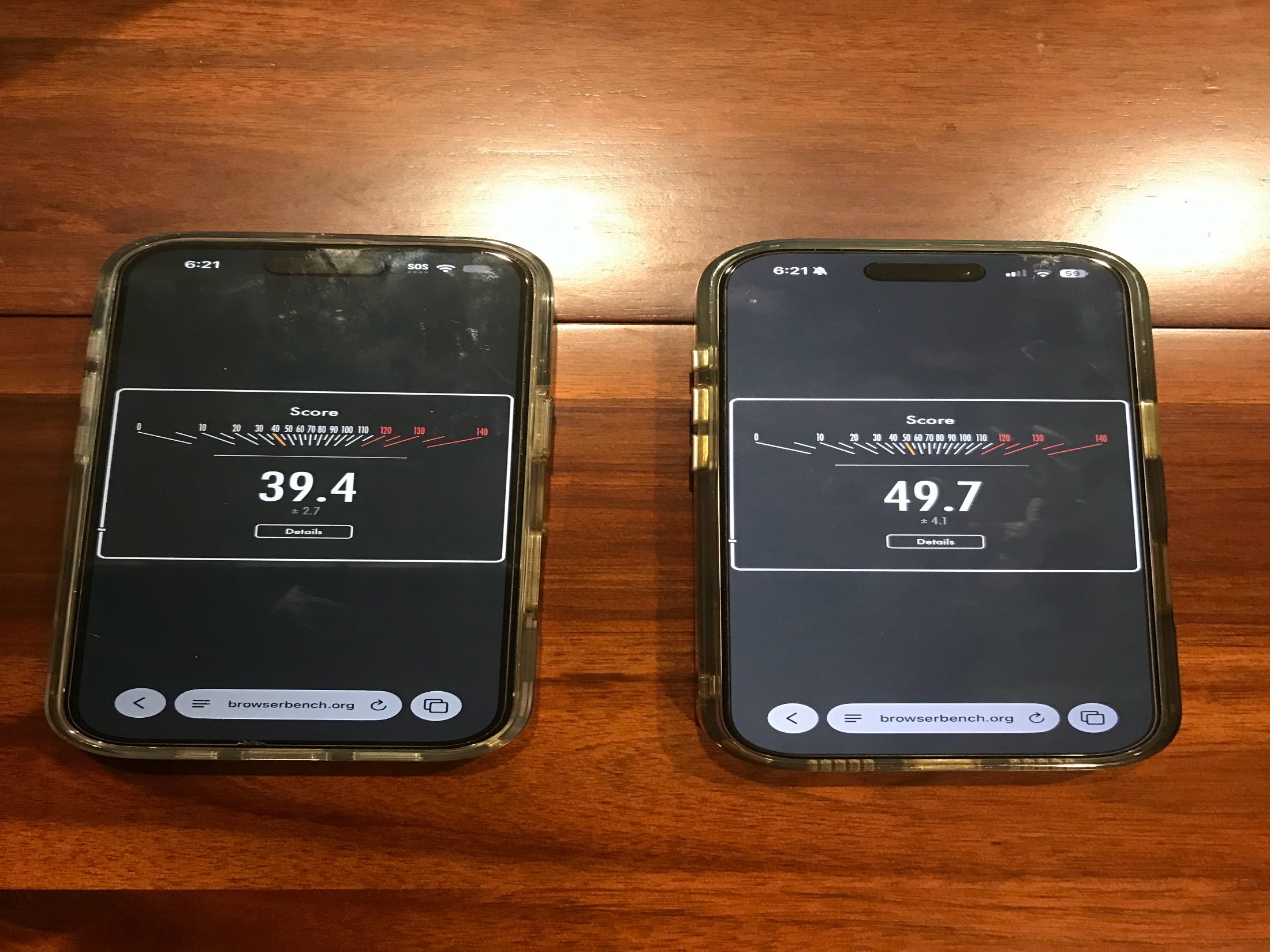
Photograph of two iPhones side by side on a wooden desk, both showing a Speedometer 3.1 result in Safari. The iPhone 14 Pro on the left reads 39.4 and the iPhone 17 Pro on the right reads 49.7.

A 2022 iPhone and a 2026 iPhone, both measured 24 hours after updating to iOS 27. Both got faster. The four-year-old phone gained 4.8 points more.

Categories Apple

Everyone Says Wait a Few Days After an Update. We Measured During the Wait.

October 14, 2026September 18, 2026 by TK Lee
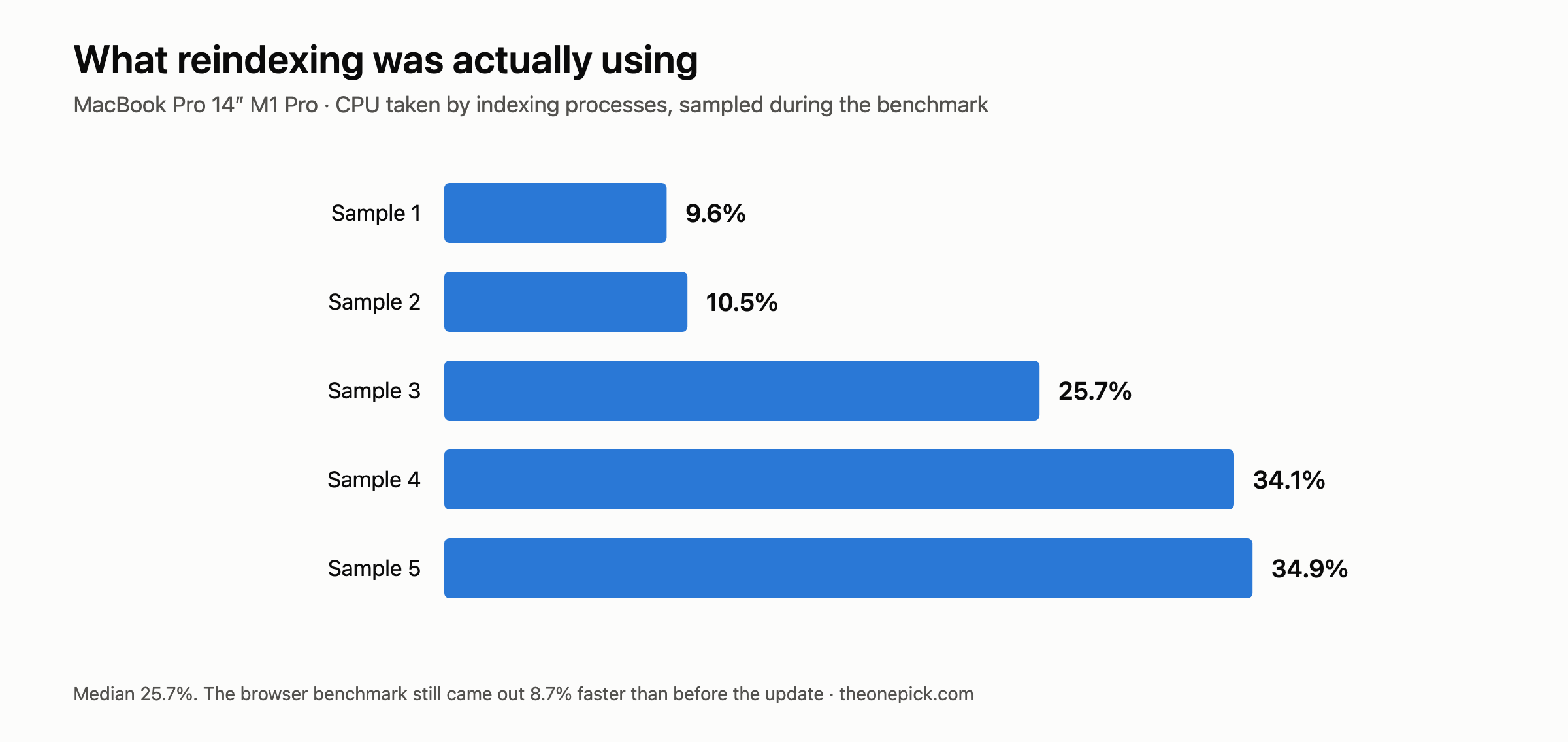
Bar chart of five CPU samples taken two seconds apart during the benchmark on a MacBook Pro 14-inch M1 Pro: indexing processes used 9.6%, 10.5%, 25.7%, 34.1% and 34.9% of CPU. Median 25.7%.

Every guide says wait a few days before judging an update. We measured during the wait, watched reindexing take a quarter of a CPU, then measured again after.

Categories Apple

The Update Made Our Browser Faster and Our Mac Slower. Same Machine.

October 15, 2026September 18, 2026 by TK Lee
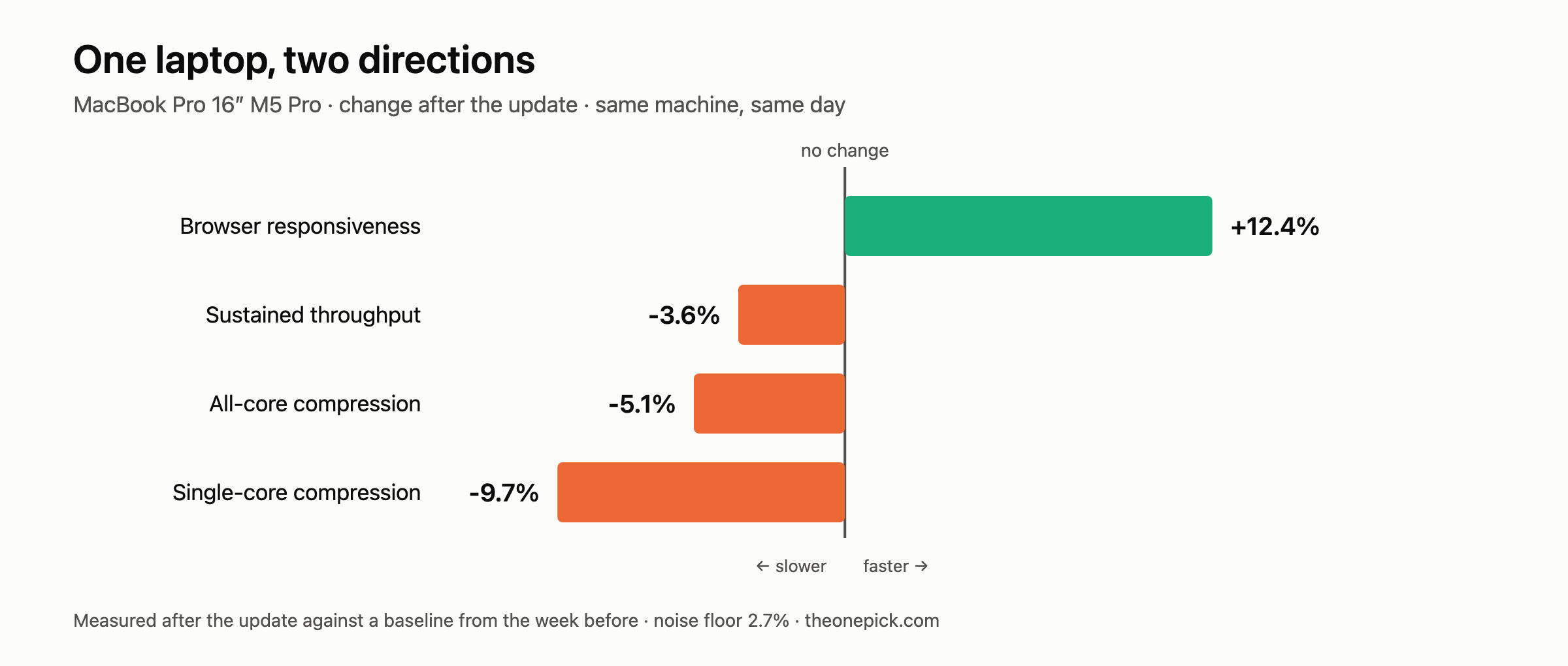
Diverging bar chart for a single MacBook Pro 16-inch M5 Pro after the update: browser responsiveness up 12.4%, while sustained throughput is down 3.6%, all-core compression down 5.1% and single-core compression down 9.7%.

The same MacBook Pro ran the browser 12.4% faster and every compute test 0.7% to 5.6% slower after the update. Same machine, same day, same measuring session.

Categories Apple

Apple Says the Update Makes Things Faster. We Measured Five Devices.

October 16, 2026September 18, 2026 by TK Lee
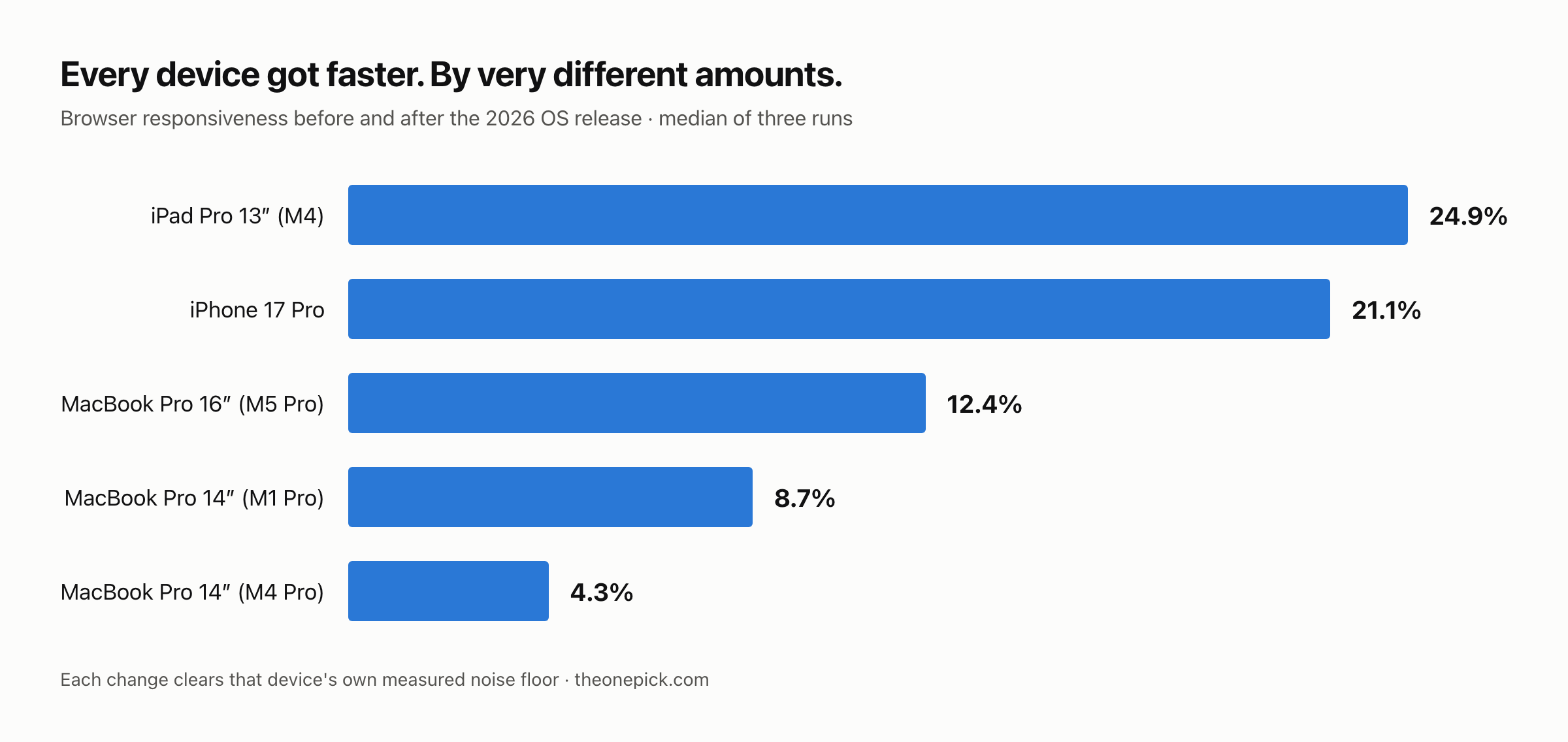
Horizontal bar chart of browser benchmark gains after the 2026 OS update: iPad Pro 13-inch M4 up 24.9%, iPhone 17 Pro up 21.1%, MacBook Pro 16-inch M5 Pro up 12.4%, MacBook Pro 14-inch M1 Pro up 8.7%, MacBook Pro 14-inch M4 Pro up 4.3%.

Five devices with measured baselines from the week before. All five got faster after the update — by between 4.3% and 24.9%. The spread is the part worth reading.

Categories Apple

No, Unplugging Your MacBook Doesn’t Slow It Down. The Gap Was 1.2%.

October 15, 2026September 15, 2026 by TK Lee
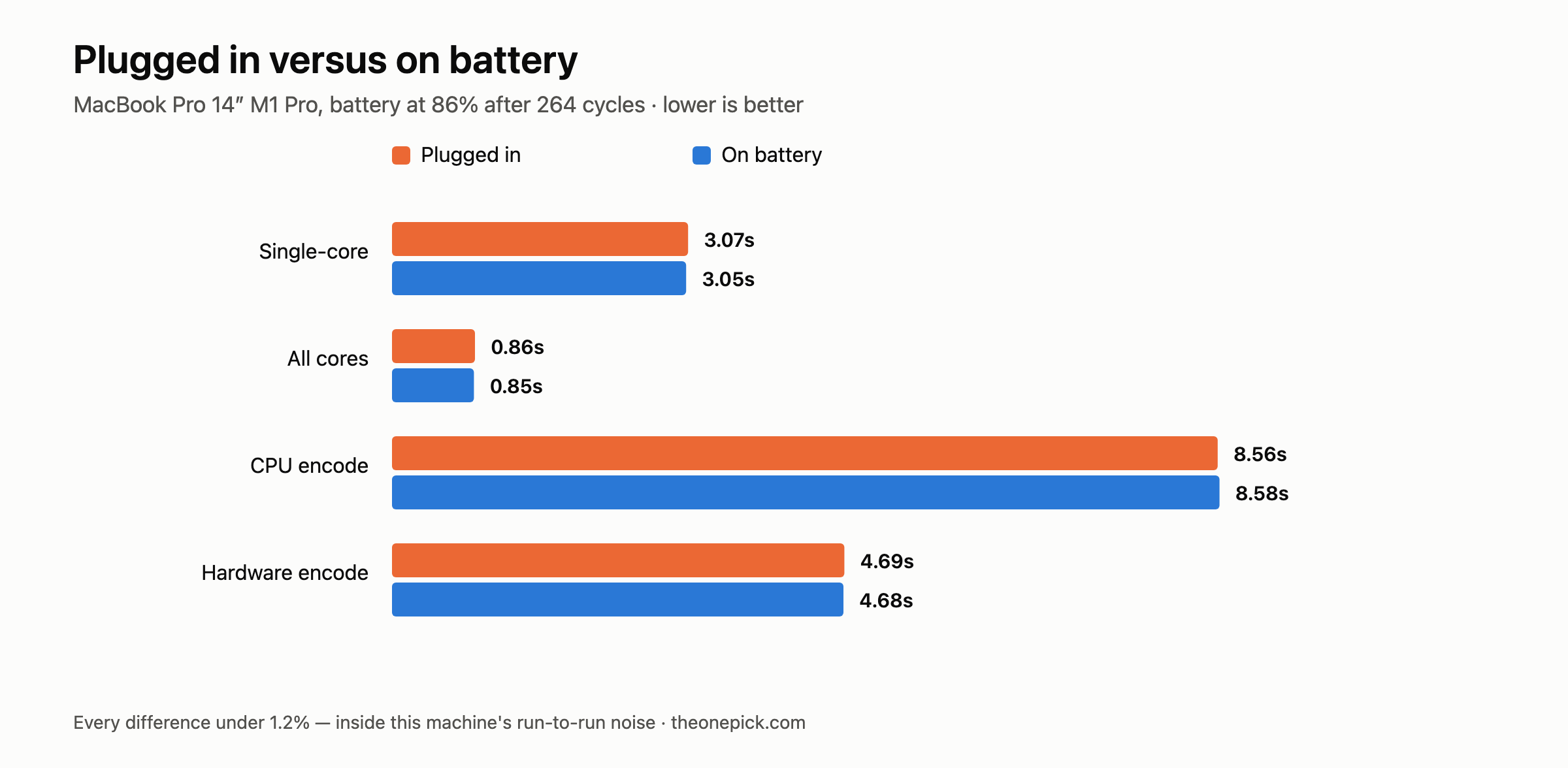
Paired bar chart of a 14-inch M1 Pro with its battery at 86 percent, plugged in versus on battery: single-core 3.07 and 3.05 seconds, all cores 0.86 and 0.85, CPU encode 8.56 and 8.58, hardware encode 4.69 and 4.68.

A four-year-old MacBook Pro at 86% battery ran every test at full speed unplugged. The widest gap we found was 1.2% — inside this machine’s run-to-run noise.

Categories Apple

Your MacBook Is Slower Than It Should Be. Here’s the 20% You’re Losing.

October 6, 2026September 15, 2026 by TK Lee
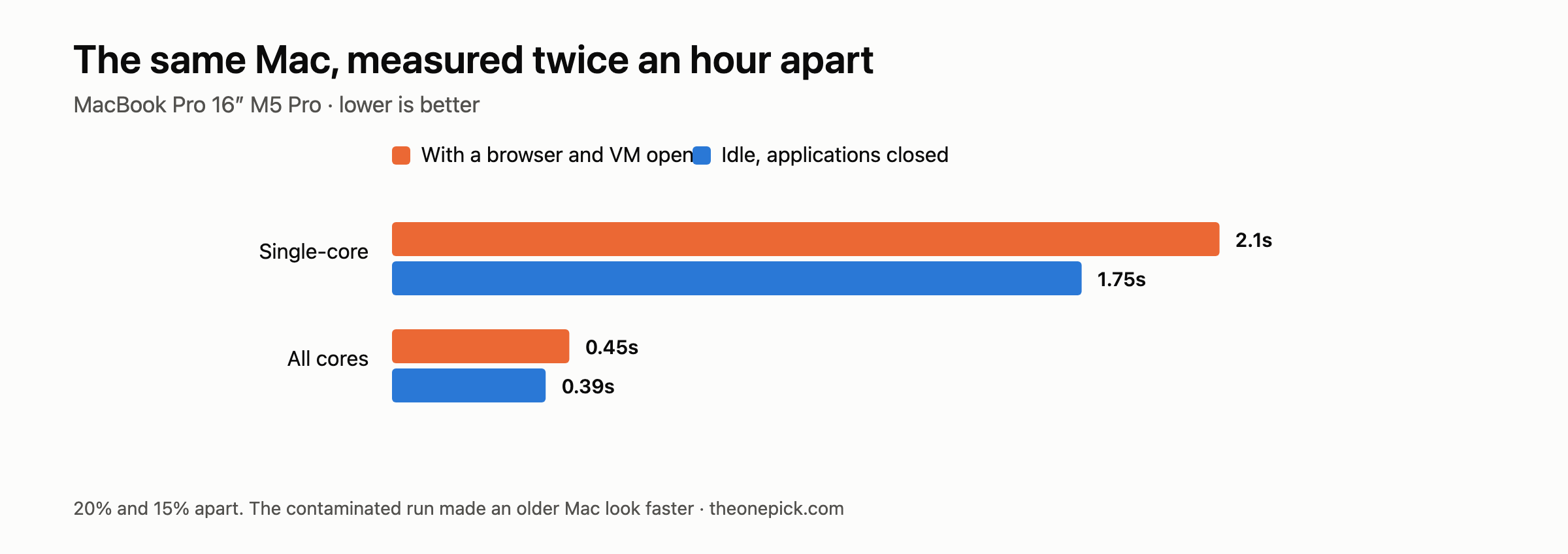
Paired bar chart of the same 16-inch M5 Pro measured twice an hour apart. With a browser and virtual machine open versus idle: single-core compression 2.1 versus 1.75 seconds, all-core compression 0.45 versus 0.39 seconds.

The same Mac, measured twice an hour apart, came out 20% apart. The machine never changed. The contaminated run made an older Mac look faster than a newer one.

Categories Apple

Does Your MacBook Slow Down Under Load? We Ran Three Flat Out to Find Out.

October 14, 2026September 15, 2026 by TK Lee
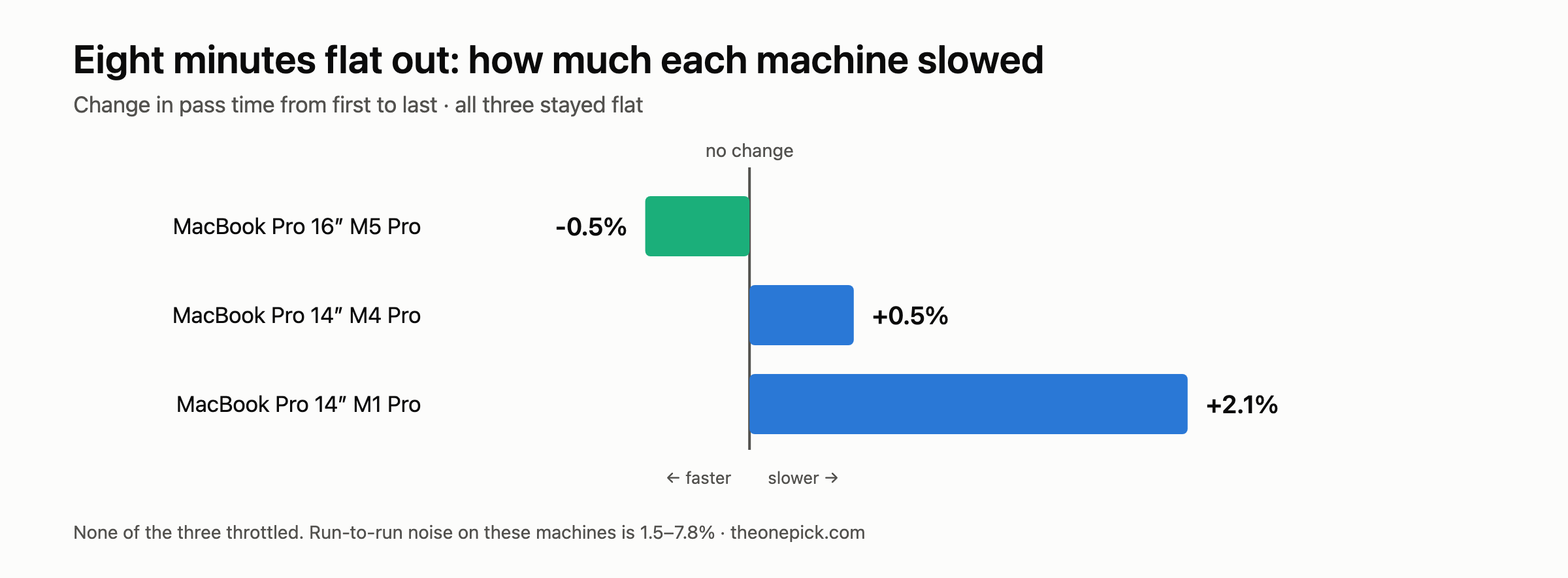
Diverging bar chart of how much each machine slowed over eight minutes at full load, measured from first pass to last: M5 Pro 0.5 percent faster, M4 Pro 0.5 percent slower, M1 Pro 2.1 percent slower. None of the three throttled.

Eight minutes at full load on three MacBook Pros. None of them throttled — the oldest finished 2.1% slower than it started, which is inside its own noise.

Categories Apple
Older posts
Newer posts
← Previous Page1 Page2 Page3 Next →
AboutHow We TestContactPrivacy PolicyAffiliate Disclosure
© 2026 The One Pick • Built with GeneratePress