Every guide to a major OS update tells you the same thing: performance is bad for the first few days while the device reindexes in the background, so wait before judging it. Nobody says how they know, and the numbers they give do not agree with each other — 24 to 48 hours, 48 to 72 hours, three to five days, “a few days.”
We had performance baselines on five devices, so we updated them and measured inside that window on purpose. Here is what reindexing actually looked like.
Reindexing is real and we caught it working
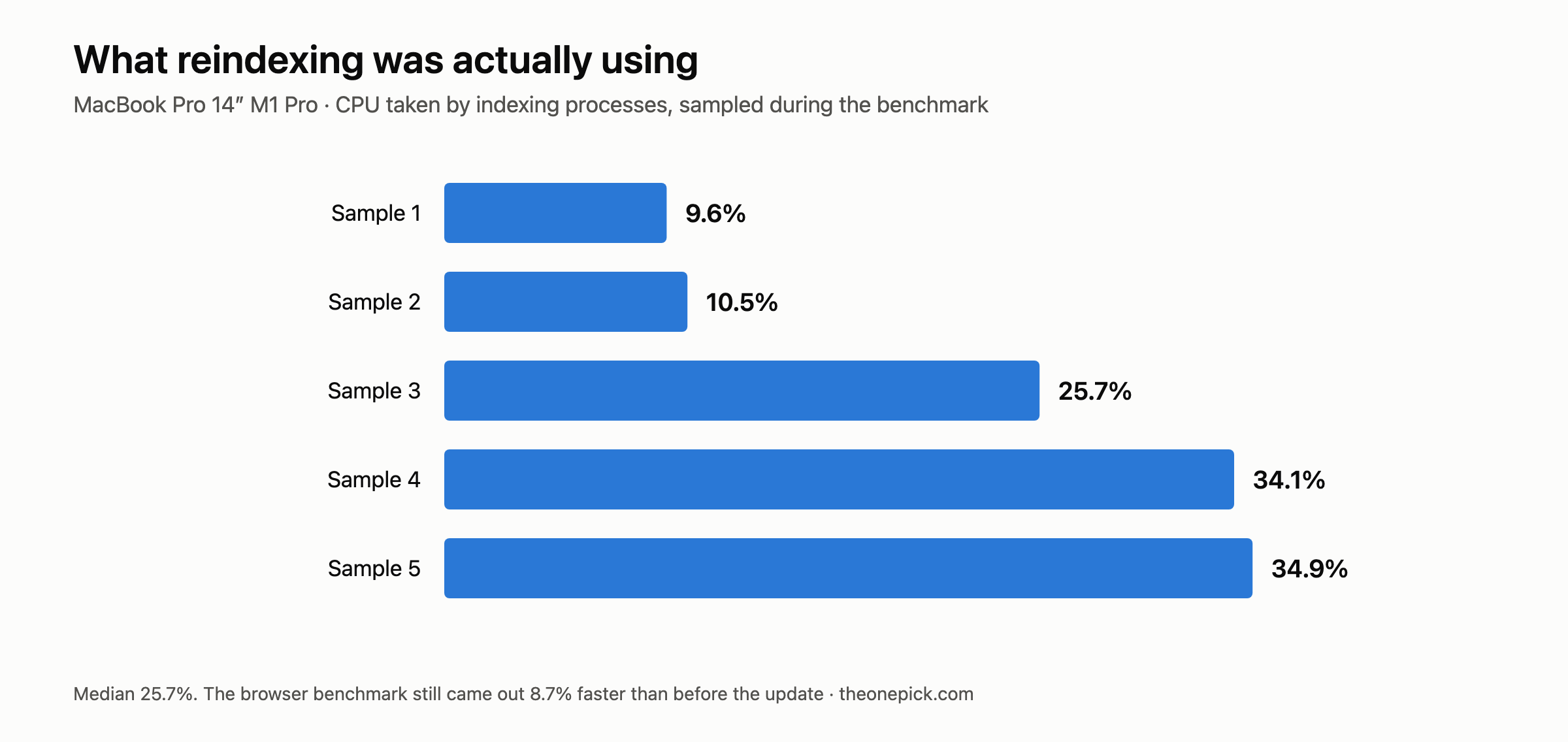
On our 2021 MacBook Pro we sampled CPU usage of the indexing processes five times during the measurement run, two seconds apart:
9.6% · 10.5% · 25.7% · 34.1% · 34.9%
Median 25.7%. The machine was genuinely giving up a quarter of its processor to Spotlight indexing, photo library work and related background tasks while we benchmarked it.
This matters because it is the part most coverage asserts without checking. We can tell you reindexing was running because we watched the processes consume CPU, not because an article said it would be.
Counting processes does not tell you this
We got this wrong first, and the error is worth explaining because it is easy to repeat.
Our initial check listed the indexing processes and counted them. On one Mac we found six mdworker processes plus mds_stores and photolibraryd, and concluded that reindexing was still running 38 hours after the update.
It was not. Those processes had each consumed under a tenth of a second of CPU time across their entire lifetime. macOS keeps a pool of mdworker processes alive whether or not there is work for them. Presence is not activity.
When we measured CPU usage instead, that machine showed a median of 0.1% — reindexing had finished. The process count had told us nothing.
If you want to know whether your own machine is still working through the backlog:
ps -Aceo pcpu,comm | grep -E "mdworker|mds_stores|photoanalysisd|photolibraryd"
Sum the first column. Take several samples a couple of seconds apart and use the median, because a single reading catches momentary spikes and tells you the wrong thing.
The performance did not suffer
Here is the result we did not expect. Measured during the window everyone says to skip:
| Device | Time since update | State | Browser performance |
|---|---|---|---|
| iPhone 17 Pro | 1h 54m | post-update | +9.5% |
| iPad Pro 13″ | same session | post-update | +24.9% |
| MacBook Pro 14″ M1 Pro | during indexing, 25.7% CPU | actively indexing | +8.7% |
The M1 Pro is the striking one. A four-year-old laptop, handing a quarter of its processor to background indexing, still ran the browser benchmark 8.7% faster than it had before the update — against a noise floor of 2.0% measured on that machine.
Every device was faster than its baseline with indexing still running. That was our finding when we first published this page.
If what you actually want is the decision rather than the mechanism, we answered it separately: should you update your iPhone 17 to iOS 27.
We went back to the iPhone, and the number moved
The iPhone reading above was taken 1 hour 54 minutes after its update. We measured the same phone twice more, under the same conditions, as the window closed.
| Time since update | Median | vs baseline 43.2 |
|---|---|---|
| 1 hour 54 minutes | 47.3 | +9.5% |
| 24 hours | 52.3 | +21.1% |
| 48 hours | 54.5 | +26.2% |
All three readings clear the 5.3% noise floor we measured on that phone, and the direction never reversed. The device simply kept getting faster as the background work drained away.
So the during-the-window reading was not wrong. It was incomplete — it captured about a third of the eventual gain. A phone measured two hours after an update will tell you the update helped. It will not tell you by how much.
How long it actually ran
We have two data points and they do not agree, which is itself the finding.
On our M5 Pro, indexing had finished within 38 hours — that is when we first measured CPU usage properly and found it at zero. It may have finished much earlier; we did not sample continuously, so 38 hours is an upper bound, not a duration.
On our M1 Pro, indexing was still consuming 25.7% of CPU at the point we measured, which was under two hours after its update.
Those are consistent with each other and with the published ranges. What they do not support is any specific number. We cannot tell you how long to wait, and neither can anyone else who has not sampled a machine repeatedly through the window. We did not do that either — it needs a measurement every hour for several days, and we have not run it.
The disk space question
Something else moves during this period, and it moves in both directions.
| Machine | Free space before | After | Change |
|---|---|---|---|
| MacBook Pro 16″ M5 Pro | 681.4 GB | 671.0 GB | −10.4 GB |
| MacBook Pro 14″ M4 Pro | 858.3 GB | 844.3 GB | −14.0 GB |
| MacBook Pro 14″ M1 Pro | 240.6 GB | 243.3 GB | +2.7 GB |
Two machines lost space. One gained it.
The machine that gained was the one that skipped a version — it came from an older point release than the other two. A plausible explanation is that the larger jump let the system discard more old files than it added. We did not verify that, and we are not going to present a guess as a finding.
We also watched the M4 Pro’s free space keep falling between two measurements hours apart, from 851.0 GB to 844.3 GB, without us installing anything. Whatever the update was still writing, it was not finished when the installer said it was.
What this means practically
Measure early for a direction. Wait a day for a number. Every reading we took during active indexing pointed the right way, so a two-hour measurement will tell you whether an update helped. But on the one device we tracked across the whole window, the gain more than doubled between two hours and twenty-four. If the size of the change matters to you, give it a day.
You should not panic about the first day. Indexing is real, it consumes meaningful CPU, and your battery will notice. But on our hardware it did not stop the machine from being faster than it was before.
Do not trust a duration you were given without a measurement behind it. Including ours — we have an upper bound on one machine and a single reading on another, and that is not enough to tell you when your device will settle.
Correction, 18 September 2026. This page originally stated that our readings taken during active indexing were consistent with those taken afterwards. They were not. We had a single post-update session on the iPhone at the time. Two further sessions, at 24 and 48 hours, show the gain rising from +9.5% to +21.1% to +26.2%. The section above has been rewritten and the practical advice changed accordingly. The original measurements are unaltered.
Measured 15-18 September 2026. iPhone 17 Pro (iOS 26.6.2 → 27.0), iPad Pro 13-inch M4 (iPadOS 26.6.1 → 27.0), MacBook Pro 16-inch M5 Pro and 14-inch M4 Pro (macOS 26.6.2 → 27.0), MacBook Pro 14-inch M1 Pro (macOS 26.5.1 → 27.0). Speedometer 3.1 in Safari, three runs each, medians reported. CPU activity sampled five times at two-second intervals.
The baselines these readings are measured against were taken across five devices the week before. See the Mac side of that.