A four-year-old MacBook Pro with a worn battery ran every benchmark we gave it at full speed on battery power. The largest gap we measured between plugged in and unplugged was 1.2%, which is inside the noise this machine produces run to run. On Apple Silicon, the belief that unplugging costs you performance did not survive a stopwatch.
The test
We ran the same four workloads on a 14-inch M1 Pro twice: once with the power adapter connected, once on battery. Nothing else changed — same session, same machine, same background state, no Low Power Mode, three runs of each test with the median reported.
| Test | Plugged in | On battery | Difference |
|---|---|---|---|
| Single-core compression | 3.07s | 3.05s | 0.7% faster unplugged |
| All-core compression | 0.86s | 0.85s | 1.2% faster unplugged |
| CPU video encode | 8.56s | 8.58s | 0.2% slower unplugged |
| Hardware video encode | 4.69s | 4.68s | 0.2% faster unplugged |
Two results went slightly up, two went slightly down. That pattern — differences scattered in both directions, all of them tiny — is what you see when the thing you are testing has no effect and you are reading measurement noise.
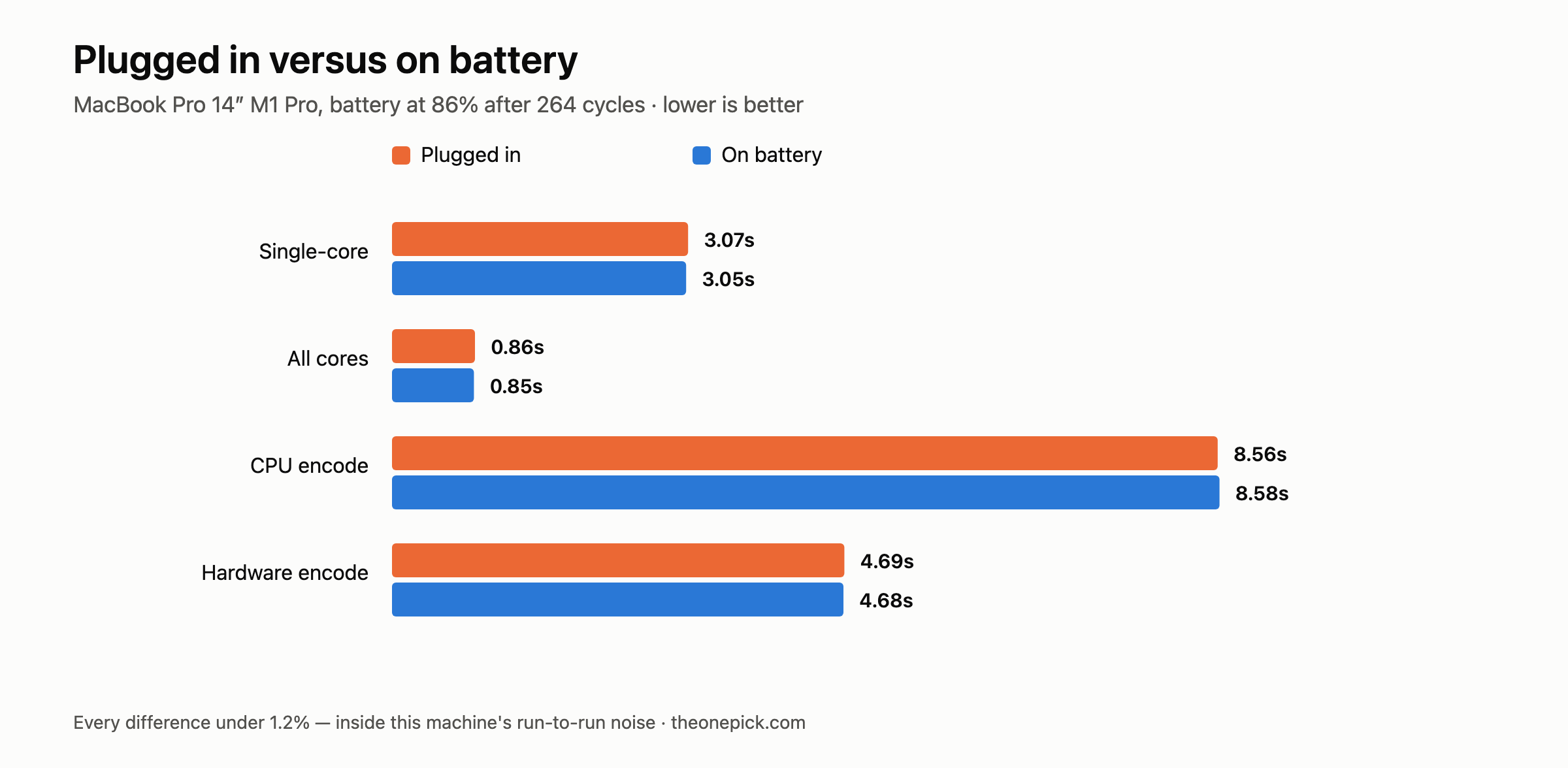
For scale: our run-to-run spread on this machine was 1.3% on the single-core test and 2.6% on the all-core test. Every battery-versus-adapter difference is smaller than the variation between repeats of the same test.
Why this machine was the right one to test
The M1 Pro is the worst case available to us, which is what makes the result interesting. Its battery reports 86% of original capacity after 264 charge cycles — roughly four years of daily use. If the fear were going to be true anywhere, it would be true on a battery that has lost 14 points of capacity.
A worn battery genuinely does lose the ability to deliver current at its original peak. That is real physics. The question this test answers is whether it has degraded enough to constrain the processor, and on this machine after four years, it has not.
We have not tested a battery in worse condition. A unit showing Service Recommended in macOS is a different situation — that status means something is wrong beyond ordinary wear, and we would not extrapolate our result to it.
Where the belief comes from
It is not made up. On many Windows laptops it is straightforwardly true: unplug and the machine drops into a lower power profile, and heavy work gets slower. People who move to a Mac reasonably carry the expectation across.
There is also a setting on the Mac that does exactly this, and it is easy to have on without noticing. Low Power Mode (System Settings → Battery) reduces performance deliberately to extend runtime, and it can be configured to engage automatically whenever the machine is on battery. If your Mac feels slower unplugged, this is the first thing to check — the behaviour is real, but it is a setting you chose rather than something the hardware imposes.
Our test ran with Low Power Mode off in both conditions.
What unplugging does cost
Runtime, obviously — but there is one more thing worth knowing.
Sustained heavy work on battery drains it fast enough that the practical limit is charge, not clock speed. A machine working hard continuously on a worn battery will run out of power long before performance becomes the binding constraint. The number that limits you unplugged is how many minutes you get, not how fast those minutes are.
That reframes the buying question. If you are choosing hardware for portable heavy work, the specification to look at is battery capacity and efficiency, not whether the chip will hold its clocks. On the evidence here, it will.
How to check your own machine
Run any repeatable, CPU-heavy task three times plugged in, then three times on battery, and compare medians. Compression works well because it is deterministic:
zstd -12 -f -q -T0 -o /tmp/out.zst /tmp/bigfile.bin
Before you start, confirm two things or the comparison is meaningless:
- Low Power Mode is off in both conditions. System Settings → Battery → Low Power Mode → Never.
- Nothing else is running. Background applications shifted our numbers by up to 20% in a separate test — far more than the effect you are trying to measure here.
If your battery results come in materially slower and Low Power Mode is off, that is worth investigating. Check Battery Health for a Service Recommended status, which would point at the battery rather than at any general rule about Macs.
Confirming Low Power Mode is actually off
The setting has three states and the middle one is the trap. System Settings → Battery → Low Power Mode offers Never, Only on Battery, Only on Power Adapter, and Always. If yours is set to Only on Battery, the machine behaves exactly the way the myth describes — and it will do so silently, because nothing on screen tells you the mode has engaged.
You can read the current state without opening System Settings:
pmset -g | grep lowpowermode
A value of 1 means it is active right now. If you are comparing plugged-in and unplugged numbers, check this in both conditions rather than once — the whole point of the setting is that it changes between them.
The other thing to check is battery condition. Run system_profiler SPPowerDataType | grep Condition. If it returns anything other than Normal, the battery has a fault rather than ordinary wear, and nothing in this article applies to your machine.
Correction, October 2026
We called the compression workload above an all-core test. It is not one. We later measured how much of the machine it occupies and the answer is roughly a third — the job waits on the disk for the rest of the time. The individual timings in the table are correct, but the label was wrong, and one sentence further up that claimed the test used every core has been removed.
This narrows what the article proves. Four workloads that each leave part of the chip idle showed no difference between battery and adapter. A load that pins every core draws considerably more power, and that is the condition where a power limit would be most likely to appear. We have not run the battery-versus-adapter comparison under that load, so we cannot tell you it holds there.
The limits of this test
One machine, one chip generation, one session. We have not run the same comparison on the M4 Pro or the M5 Pro, so we cannot tell you the behaviour is universal across Apple Silicon — only that it held on the oldest and most worn machine we own, which is where we expected it to fail.
We also tested burst workloads lasting seconds to minutes, not hours. A long sustained load on battery brings heat and charge state into play together, and we have not measured that combination.
Measured 14 September 2026 on a MacBook Pro 14-inch M1 Pro (16GB/512GB, macOS 26.5.1 build 25F80), battery at 86% maximum capacity and 264 cycles. Three runs per test, median reported, Low Power Mode off throughout.
This machine is one of three we tested the same week. See how it compares to an M4 Pro and an M5 Pro.