If you are still on an M1 Pro MacBook Pro, the case for replacing it is weaker than the marketing suggests and stronger than the spec sheet does — and which one applies to you depends on a single question: does your heavy work run on the CPU, or on the video encoder?
We own an M1 Pro and an M5 Pro and measured both. Here is the decision, laid out the way we would explain it to someone who asked.
Start here: what do you actually run?
This is the whole decision, so answer it before looking at any number.
| If your heavy work is… | The M5 Pro is | Verdict |
|---|---|---|
| Video export through the hardware encoder | 1.40x faster | Hard to justify |
| Browser and text | 1.54x faster | Hard to justify |
| Compilation, compression, CPU-bound work | 3.47x faster | Worth considering |
| Software video encoding | 2.38x faster | Worth considering |
| Long jobs where total throughput matters | 2.16x more work in 8 minutes | Worth considering |
Updated October 2026: the CPU-bound row read 2.18x when this was published. The corrected figure is 3.47x, and the reason is explained below. The other rows are unchanged.
The spread between the top and bottom of that table is 70 percentage points. Four years of silicon bought some people a machine that finishes in less than half the time, and other people a 40% improvement they will notice mainly on their credit card statement.
Most “should you upgrade” advice collapses this into one average. The average is useless to you, because you are not the average — you are whichever row describes your Tuesday.
Update, October 2026: the CPU-bound row was too low
The 2.18x in that row came from a compression test run with every thread enabled. We later checked how much of the machine that job actually occupies, and on the 18-core M5 Pro the answer is about 31%. The rest of the time it is waiting on the disk. It measured compression correctly; it did not measure what the chip does with all of its cores working.
We re-ran both machines on a workload that genuinely pins every logical core, eight rounds each, both on macOS 27.0.1. The M5 Pro does 3.47 times the work of the M1 Pro, not 2.18.
That gap divides cleanly: the M5 Pro has 2.25 times the cores, and each core does 1.54 times the work. Multiply the two and you get the 3.47x.
This makes the case for upgrading stronger, but only for one kind of person. If you wait on jobs that spread across every core — compiling, rendering, bulk encoding, a stack of containers — the real multiplier is 3.47x and it is the largest number in this article.
If you do not, nothing here moves. The 1.40x video row and the 1.54x browser row were never about core count, and the correction does not touch them. Notice that the 1.54x browser figure is exactly the per-core improvement. That is not a coincidence — it is what four years of silicon bought you on work that only uses a few cores at a time, and for most people most of the day, that is the number that applies.
Full figures and method are in the three-generation comparison, which carries the same correction.
Who should not upgrade
If you export video through the hardware encoder. 1.40x was the smallest gain we measured anywhere, across any test, on any pair of machines. If that is your bottleneck, four years of waiting bought you very little, and waiting longer costs you very little.
If your machine mostly runs a browser and a text editor. 1.54x on browser responsiveness is real but it is not the thing standing between you and finishing work. Your M1 Pro is not the reason your day is slow.
If you were about to upgrade because it “feels old.” Measure first. Our M1 Pro produced one benchmark run 18% below its own average — the kind of result that makes a machine feel like it is dying. It was not: two clean runs agreed within 0.5%, an eight-minute sustained load showed no throttling at all, and the machine held full performance on battery power. A machine that feels slow sometimes is often a machine with something running in the background. On our M5 Pro, an open browser and a virtual machine cost 20% on a single-core benchmark.
Who should upgrade
If you are CPU-bound and you wait on your machine. 3.47x on work that uses every core and 2.38x on software video encoding are large enough that they change how you plan your day, not just how long a progress bar runs.
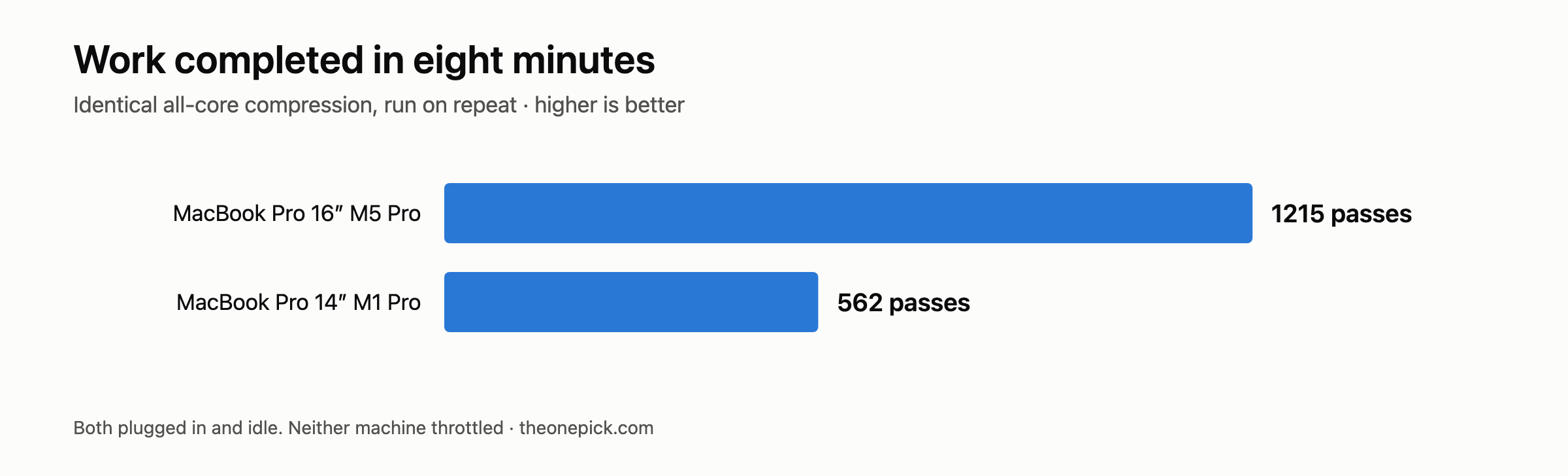
If you run long jobs. The throughput number is the one to look at: in eight minutes of continuous all-core load, the M5 Pro completed 1,215 passes to the M1 Pro’s 562. Neither machine throttled — the M1 Pro held its speed to within 2.1% from first pass to last — so this is pure per-pass speed compounding over time. On an hour-long job it is the difference between one hour and a little over two.
If the battery has become the constraint. This is the reason people forget. Our M1 Pro reports 86% of original capacity after 264 cycles and roughly four years of use. It still runs a full day of light work, and it delivers full performance unplugged — we measured that separately and the gap between mains and battery was under 1.2%. But 14% less capacity is 14% fewer hours, and if you are already hunting for outlets, that is a real reason to move that has nothing to do with speed.
Common questions
Is an M5 Pro worth it coming from an M1 Pro?
It depends on one thing: whether your work uses every core. If it does, the M5 Pro does 3.47 times the work and the case is strong. If it does not, you are buying 1.54x on browser and text work and 1.40x on hardware video encoding, which is hard to justify against the price.
How does an M1 Pro compare to an M5 Pro in benchmarks?
Across the tests we ran on machines we own: 1.40x on hardware video encode, 1.54x on browser work, 2.38x on software video encode, and 3.47x on an all-core load. Any single benchmark number for this comparison is answering only one of those questions.
Is the four-year-old battery a reason to replace the machine?
Not on its own. Ours holds 86% of its original capacity after 264 cycles and runs at full speed unplugged. A battery replacement costs a fraction of a new machine — what four years actually did to ours.
What we cannot tell you
Whether it is worth the money. We measured performance. We did not price anything, we did not look up what an M1 Pro fetches used, and we have no idea what your time is worth. A 2.38x gain is either obviously worth it or obviously not depending on numbers we do not have, and we are not going to pretend otherwise.
Whether an M4 Pro is the better buy. We own one, and it landed 6% to 9% behind the M5 Pro across everything we ran — a gap you will not feel. If you can get an M4 Pro meaningfully cheaper, almost everything in this article applies to it too. We cannot tell you the price difference, only that the performance difference is small.
How this holds under longer loads. Our sustained test ran eight minutes. If your work is measured in hours, thermal behaviour over that span could change the picture and we have not measured it.
The caveats inside our numbers
Our two machines differ in more than their chips, and the honest reading requires knowing how:
- Memory. The M1 Pro has 16GB, the M5 Pro 48GB. Nothing we ran pushed either into swap, so we do not believe memory drove these results — but we did not measure memory pressure, so we cannot rule it out.
- Chassis. The M1 Pro is 14-inch, the M5 Pro 16-inch. The larger machine has more cooling, which matters most in the sustained-throughput row.
- OS version. The M1 Pro ran macOS 26.5.1 and the M5 Pro 26.6.2. Some of the gap could be software rather than silicon.
None of these invalidate the comparison — they are the difference between the two machines a real person would actually be choosing between. But an article that quoted 2.38x without mentioning them would be selling you something.
How to decide in ten minutes
Run the same test we did on the machine you already own. This one needs no file and no installation — it ships with macOS, and it keeps every core busy, which is the whole point:
openssl speed -evp sha256 -multi $(sysctl -n hw.ncpu)
Read the figure in the last column of the final row. Ours were 16.3M on the M1 Pro and 56.6M on the M5 Pro. Run it three times and take the middle number.
Then look at your own work. If the jobs you wait on are CPU-bound, the multiplier that applies to you is the 3.47x row. If they go through the video encoder, it is the 1.40x row. Pick your row before you look at the price, because the order you do those two things in determines which answer you end up talking yourself into.
Measured 14 September 2026. MacBook Pro 16-inch M5 Pro (48GB/1TB, macOS 26.6.2) and MacBook Pro 14-inch M1 Pro (16GB/512GB, macOS 26.5.1), both plugged in and idle, median of three runs.
The full table these multipliers come from is in our M1 Pro vs M4 Pro vs M5 Pro comparison.