If you are searching for M5 MacBook Pro problems before buying one, most of what you will find is forum threads. We own a 16-inch M5 Pro, so we took the most alarming report — that identical runs of the same test can vary by more than 40% on some machines — and checked ours against it. Eight consecutive runs, 2.5% apart.
That does not mean the reports are wrong. It means whatever is causing them is not present in this unit, and it gives you a number to compare your own machine against.
What is actually being reported
Sorting the noise, there are five distinct claims in circulation. They are not equally serious and they do not all apply to the same machine.
| Report | Which machine | Can we check it? |
|---|---|---|
| Multi-core results varying wildly between identical runs | M5 Max, some units | Yes |
| Stuck on the “Activate Mac” screen during setup | M5 generally | No — ours set up normally |
| Creaking from the hinge or palm rest | M5 generally | Partly |
| Warped key from heat | M5 Max | No |
| Discolouration near the exhaust vents | M5 Max, after long AI workloads | No |
Three of the five are reported on the M5 Max, which is a different chip from the M5 Pro we have. That distinction gets lost in search results and it matters: a thermal complaint about the highest-tier chip is not automatically a statement about the tier below it.
The one worth testing: does performance wander?
This is the report that would matter most if it applied to your machine, because it is invisible. A laptop that scores differently every time it runs the same work is not obviously broken — it just feels unreliable in a way you cannot point at.
So we ran the same all-core workload eight times in a row, back to back, with every one of the eighteen cores saturated throughout. Activity Monitor read 0.10% idle for the duration, so this is a genuinely loaded machine rather than a benchmark that leaves most of the processor alone.
| Round | Throughput |
|---|---|
| 1 | 54.0M |
| 2 | 55.4M |
| 3 | 55.3M |
| 4 | 54.5M |
| 5 | 54.9M |
| 6 | 55.0M |
| 7 | 54.8M |
| 8 | 54.9M |
Fastest to slowest is 2.5% apart. The last round came in 1.6% above the first, and the slowest round was the first one — the machine warmed up and got marginally quicker rather than wilting. macOS reported a CPU speed limit of 100% in every round, meaning the system never declared itself thermally constrained.
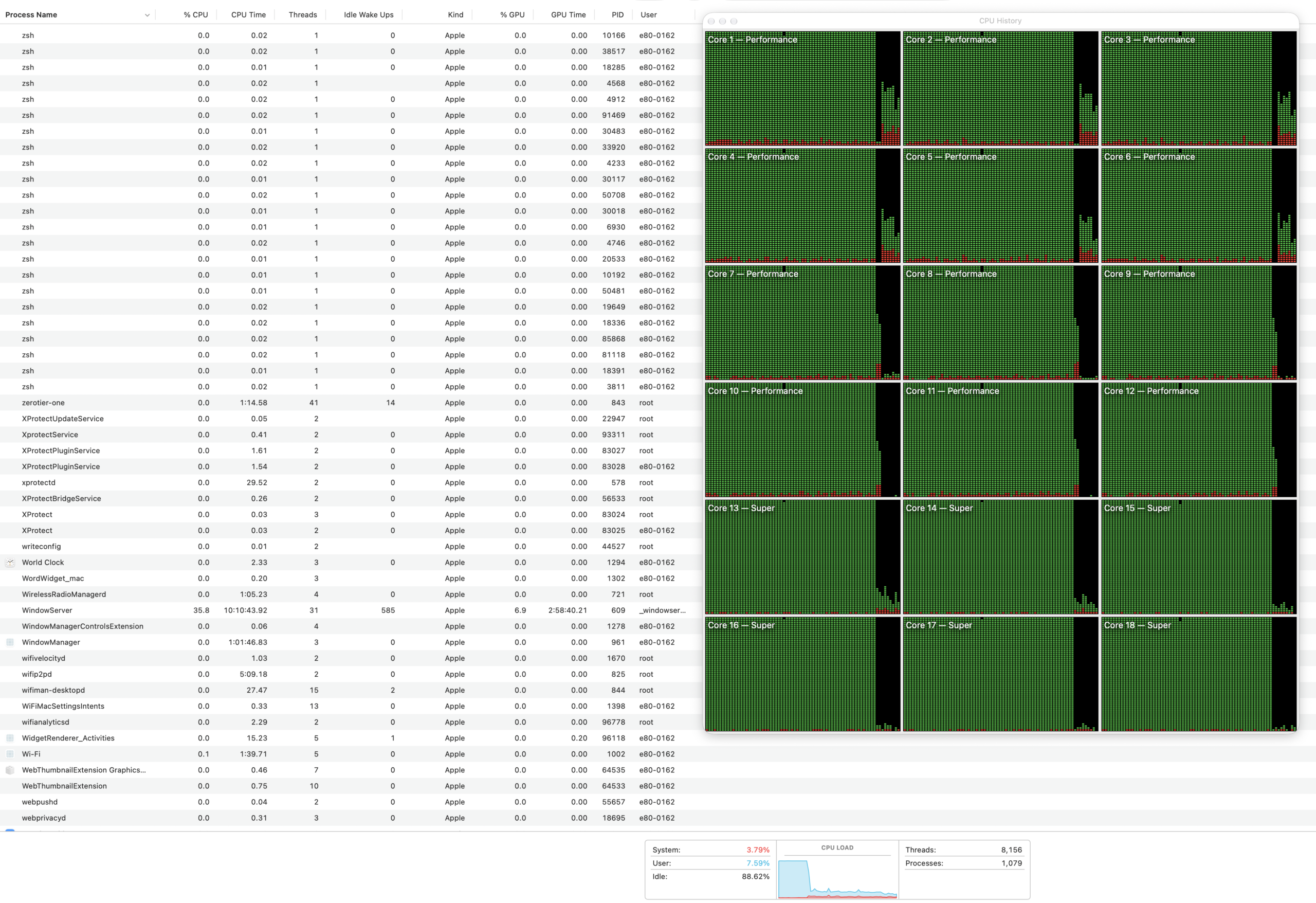
For context, the reports describe swings above 40%. Ours is inside the noise we see on any machine.
The problem we did find, and it is not the hardware
There is one real regression on this machine, and it arrived with software rather than with the laptop.
After updating to macOS 27, the same M5 Pro got 12.4% faster at browsing and slower at every compute test we ran — same afternoon, same power state, same machine. Compression with all threads dropped 5.6%, sustained throughput 3.6%, and the two video encodes about 1%. Single-core compression moved 9.4%, but three runs of that test on this machine differ by 10.5% on their own, so we do not report it as a result.
If your M5 feels slower at something specific since updating, that is the shape of it. Not the machine degrading, but one category of work getting quicker while another gets slower. It will affect every M5 equally because it is the operating system, and a returns process will not fix it.
Update, October 2026: we ran it again three and a half weeks later
The worry behind most of these reports is not really about one afternoon. It is that the machine will get worse. So we ran the identical test again on the same MacBook Pro on 12 October, after macOS 27.0.1 — same script, same workload, same eight rounds.
| 19 Sept (27.0) | 12 Oct (27.0.1) | |
|---|---|---|
| Sustained throughput | 54.9M | 56.6M |
| Round-to-round spread | 2.4% | 1.6% |
| Round 1 → round 8 | +1.6% | +0.2% |
| Rounds that throttled | 0 of 8 | 0 of 8 |
Nothing got worse. The machine held full speed through every round again, and it was slightly steadier the second time — the gap between its best and worst round narrowed from 2.4% to 1.6%. If this unit were on its way to a thermal problem, three and a half weeks and a point release is where you would expect the first hint of it. There was none.
The 3.2% we are not going to claim
Total throughput came out 3.2% higher, which is above this machine’s own noise. It would be easy to write that macOS 27.0.1 made the laptop faster. We are not going to, because the two runs were not plugged into the same thing: September ran off a Studio Display at 94W, October off the 140W adapter.
That is not a theoretical objection. The battery was charging at 6–13W during the September run and 38–67W during the October one. The 94W source was visibly being held back while the cores were busy — the laptop was taking what it needed for the chip and giving the battery what was left. Neither run ever reported a CPU speed limit below 100%, so the processor was not being slowed, but we cannot say from this pair of runs whether the 3.2% belongs to the operating system or to the wall.
If you are running your own before-and-after, that is the trap worth copying out of this: plug into the same thing both times. A dock or a display that charges your laptop is not the same power source as the adapter in the box, and the difference is large enough to swallow the effect you are trying to measure.
One thing we could not re-check: the compression regression above. The test file that produced those September figures was generated on the machine and not kept, and without the identical input a second set of timings would not mean anything. We have no honest before-and-after to offer there, so we are not offering one.
Re-measured 12 October 2026 on the same MacBook Pro 16-inch (M5 Pro, 48GB, macOS 27.0.1), eight consecutive all-core rounds, throughput and reported CPU speed limit recorded each round, as in September.
How to check your own before the return window closes
The variance report is the one you can actually test for, and you do not need our tooling to do it. The method matters more than the tool:
- Run the same heavy task several times in a row — not once. A single score tells you nothing about consistency, which is the whole question here.
- Do not let it cool between runs. Back to back is the point. A machine that only misbehaves when hot will look fine if you rest it.
- Check that the work is actually loading the machine. Open Activity Monitor and look at the idle figure while it runs. We have been caught out by this before — a workload we assumed was saturating the processor turned out to be using about a third of it.
- Compare fastest to slowest, not first to last. The spread is the number. Ours was 2.5%; the reports describe over 40%. Anything in between is a judgement call, and closer to 40 than to 2.5 is worth a conversation with Apple.
On a Mac you can watch the machine’s own view of its state while you work:
pmset -g therm
ps -Aceo pcpu,comm -r | head -5
The first prints a CPU speed limit. If it drops below 100% under load, macOS is telling you it is throttling — which is a much stronger signal than a benchmark score you are trying to interpret.
Common questions
Are there real problems with the M5 MacBook Pro?
Reports exist, mostly about the M5 Max rather than the M5 Pro, and mostly about thermals and build. On our M5 Pro the one testable claim did not reproduce: eight consecutive full-load runs varied by 1.6%, against the 40%-plus swings being described.
Does the M5 MacBook Pro throttle or slow down over time?
Ours has not. We ran the identical test three and a half weeks apart and it held full speed through every round both times, with the round-to-round spread actually tightening from 2.4% to 1.6%.
My M5 feels slower since updating. Is the machine faulty?
Probably not the machine. macOS 27 made this same M5 Pro 12.4% faster at browsing and 9.7% slower at single-core compression on the same afternoon. That affects every M5 equally and a return will not fix it — the measurements are here.
What we cannot tell you
- One machine. A 16-inch M5 Pro with 48GB. The performance-variance reports point at particular production batches, and a single healthy unit cannot disprove a batch problem — it can only tell you what a healthy one looks like.
- We do not have an M5 Max. Three of the five reports above are about that chip, including both thermal ones. We are not going to comment on hardware we have not touched.
- Eight minutes is not eight months. Discolouration and warping are reported after prolonged heavy use. Nothing we ran answers a question about months.
- We have not counted creaks. Ours does not, but build complaints are the kind of thing where one unit tells you almost nothing.
For how this M5 Pro compares with the M4 Pro and M1 Pro on the same tests, see M1 Pro vs M4 Pro vs M5 Pro, tested.
Measured 19 September 2026 on a MacBook Pro 16-inch (M5 Pro, 48GB, macOS 27.0). Eight consecutive rounds of an all-core SHA-256 workload occupying every logical core, confirmed at 0.10% idle in Activity Monitor, with throughput and the reported CPU speed limit recorded each round. Reported issues summarised from coverage on Ubergizmo, MacRumors forums and ShopSavvy; we have verified only the one we could test.