Our Apple Watch Series 7 says it is up to date. It is running watchOS 26.6, and it will never run watchOS 27, which shipped four days ago. Both of those statements are true at the same time, and nothing on the watch tells you the second one.
This is not a malfunction. It is what Apple’s update screen has always done on hardware that has reached the end of its software life. But it means the moment your watch stops being supported is a moment you will not be told about — you will find out from an article, or from a friend, or never.
The watch in question
| Model | MKNN3LL/A — Series 7, aluminium, 45mm, GPS |
| Released | 14 September 2021 |
| Running | watchOS 26.6 |
| Paired to | iPhone 17 Pro on iOS 27 |
| Update screen says | up to date |
| Automatic Updates | Off |
We own this watch. It has been worn daily since 2021, and it is the reason we are writing this rather than summarising someone else’s compatibility list.
The exact wording
Here is what the Software Update screen in the Watch app showed us on 18 September 2026, four days after watchOS 27 went out:
watchOS 26.6
Your Apple Watch is up to date with all the latest bug fixes and security enhancements
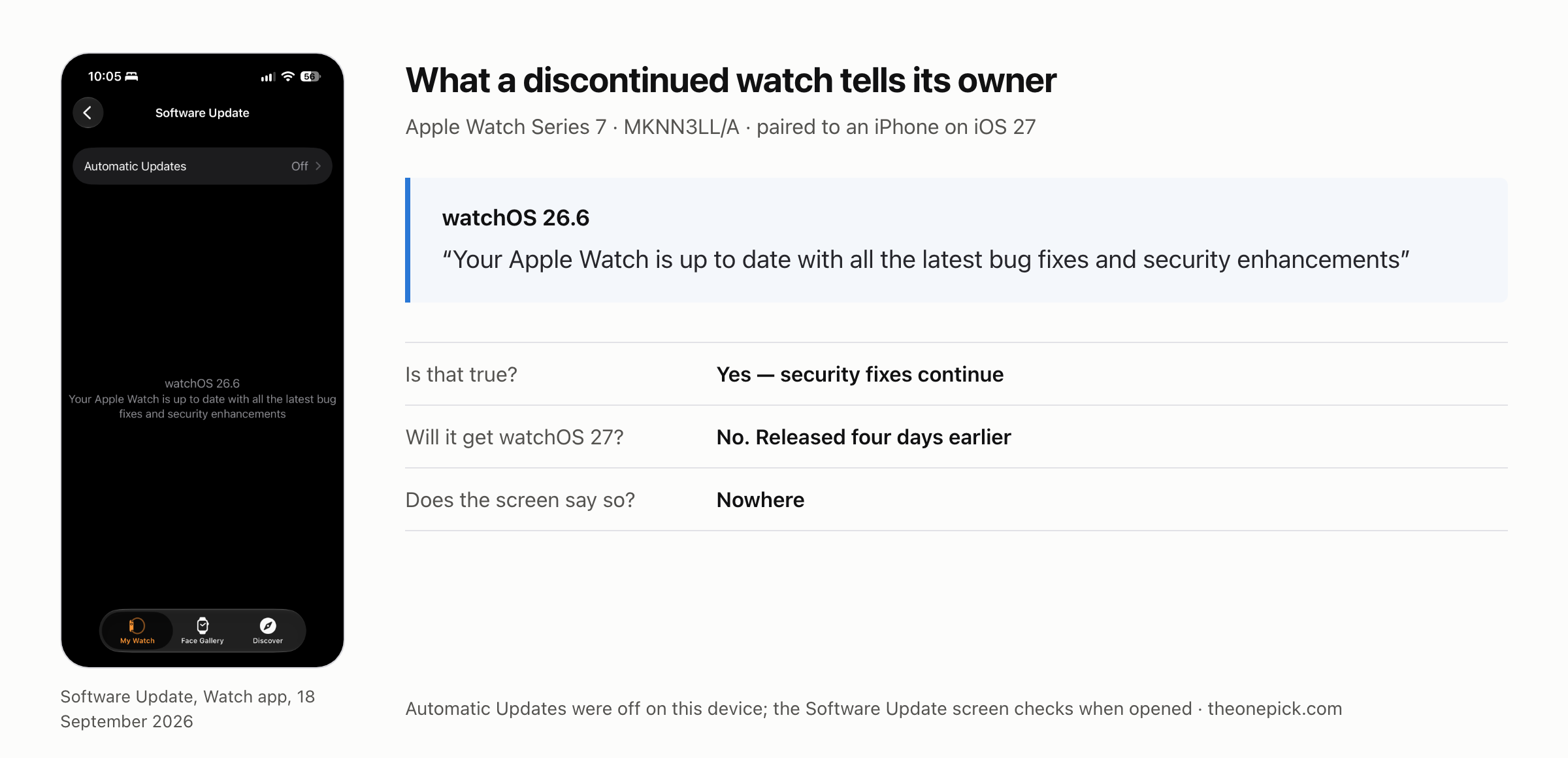
Read it closely and it is not a lie. Apple is promising bug fixes and security enhancements, and those do keep coming to this watch. The sentence is carefully true.
What it never mentions is the thing the owner would actually want to know: that this model has been left off the list for the version released that week, and that no future watchOS will install on it. There is no notice, no asterisk and no link. The watch that has been cut is the last to hear about it.
Five years to the day
The Series 7 went on sale on 14 September 2021. watchOS 27 was released on 14 September 2026.
Five years, to the day, between the watch arriving and the watch being left behind. We doubt that is deliberate, and it is a coincidence rather than a policy — but if you are trying to work out how long an Apple Watch stays current, that is the number our one data point gives you.
This was a big cut, not a normal one
watchOS 27 drops five models at once:
| Left behind | Still supported |
|---|---|
| Series 6 | Series 9 |
| Series 7 | Series 10 |
| Series 8 | Series 11 |
| SE (2nd generation) | SE (3rd generation) |
| Ultra (1st generation) | Ultra 2, Ultra 3 |
That is roughly three years of hardware retired in a single release, including the first Ultra — a watch that launched at $799 in 2022. Apple Watch releases usually drop one or two models. This one did five.
What Apple said about it
Apple gave a reason on the record, which is more than it usually does. Cait Dooley, Apple Watch and Health product marketing manager, told MacRumors that the new features “including the capabilities of Siri AI and the new tap gesture, work best with the processing power that is in Apple Watch Series 9 and later, Ultra 2 and later, and SE 3.”
Read that carefully. It is a claim about which chips run the new features well, not a claim that older chips cannot run them at all. We have no way to test that distinction — we cannot install watchOS 27 on a watch Apple will not let us install it on — so we are flagging the wording rather than drawing a conclusion from it.
Does it still work with a phone on iOS 27?
This is the question that actually matters if you own one of these five watches, and it is the one the coverage answers with a sentence and no testing. The usual line is that dropped watches keep receiving security updates and keep working with an iPhone running the latest software.
We have exactly that pairing on our desk — a Series 7 on watchOS 26.6 next to an iPhone 17 Pro on iOS 27 — so we checked it rather than repeating it.
| Check | Result |
|---|---|
| Watch app sees and manages the watch | Works |
| Connection indicator on the watch | Connected |
| Watch clock matches the phone | Matches |
| Notifications reach the watch | They arrive |
| Sleep tracking records and reaches Health | Works |
| An incoming call rings on the watch | It rings |
| Taking that call on the watch’s speaker | Works |
| A text message specifically | Not confirmed |
| Replying to a message from the watch | Not tested |
Seven things worked. Two we did not confirm, and they are in the table because leaving them out would imply we had checked them.
Sleep tracking is the most informative line in that table. It is not a single tap that either succeeds or fails. It means the watch is recording continuously through the night, holding the data, and handing it to a phone running an operating system a full major version ahead of its own — and that the phone is accepting it. A pairing that had quietly broken would not do that.
The call is the second. We went into this expecting it to be the failure — the owner of this watch had been saying for weeks that calls no longer seemed to reach it. They do. It rings, and the call can be answered and held on the watch’s own speaker, which means the audio path is intact in both directions and not merely the notification.
We suspect the original impression came from a Focus mode, or from having the iPhone unlocked and in hand — in which case iOS deliberately keeps the alert on the phone. That is documented behaviour rather than a fault, and it is worth knowing before you conclude your own watch has been cut off from something.
So on the things we checked, the claim holds on our hardware. We are not in a position to tell you that nothing at all is broken, because we did not test everything. We are in a position to tell you that the basics — pairing, notifications, continuous health data, and taking a phone call — were still working four days after the watch was left behind.
What we cannot tell you
- How long the security updates continue. Apple has never published a schedule for this, and we are not going to estimate one. Anyone giving you a number for it is guessing.
- Whether the Series 7 could have run watchOS 27. We cannot install it, so we cannot test the performance claim behind the cut-off.
- Whether five years is the pattern. We have one watch. Five years is what happened to this one, not a rule you can plan around.
- Whether you should replace it. That depends on which features you use, and we have not measured what you lose in daily use. When we have, we will say so.
How to check your own watch
On your iPhone, open the Watch app, then General → Software Update. If it tells you the watch is up to date, that is not the same as telling you the watch is still supported. Check the model against the table above — Settings → General → About on the watch itself gives you the model number.
We measure Apple hardware we own rather than summarising specifications. Here is what the same update did to a four-year-old iPhone.
If your watch is on the list of dropped models, we wrote up what actually changes when your Apple Watch is left off the list.
Checked 18-19 September 2026. Apple Watch Series 7 (MKNN3LL/A, aluminium 45mm GPS, released 14 September 2021) on watchOS 26.6, paired with an iPhone 17 Pro on iOS 27. Compatibility list and the quoted statement are Apple’s, reported by MacRumors and 9to5Mac; the device details and the update-screen behaviour are ours.