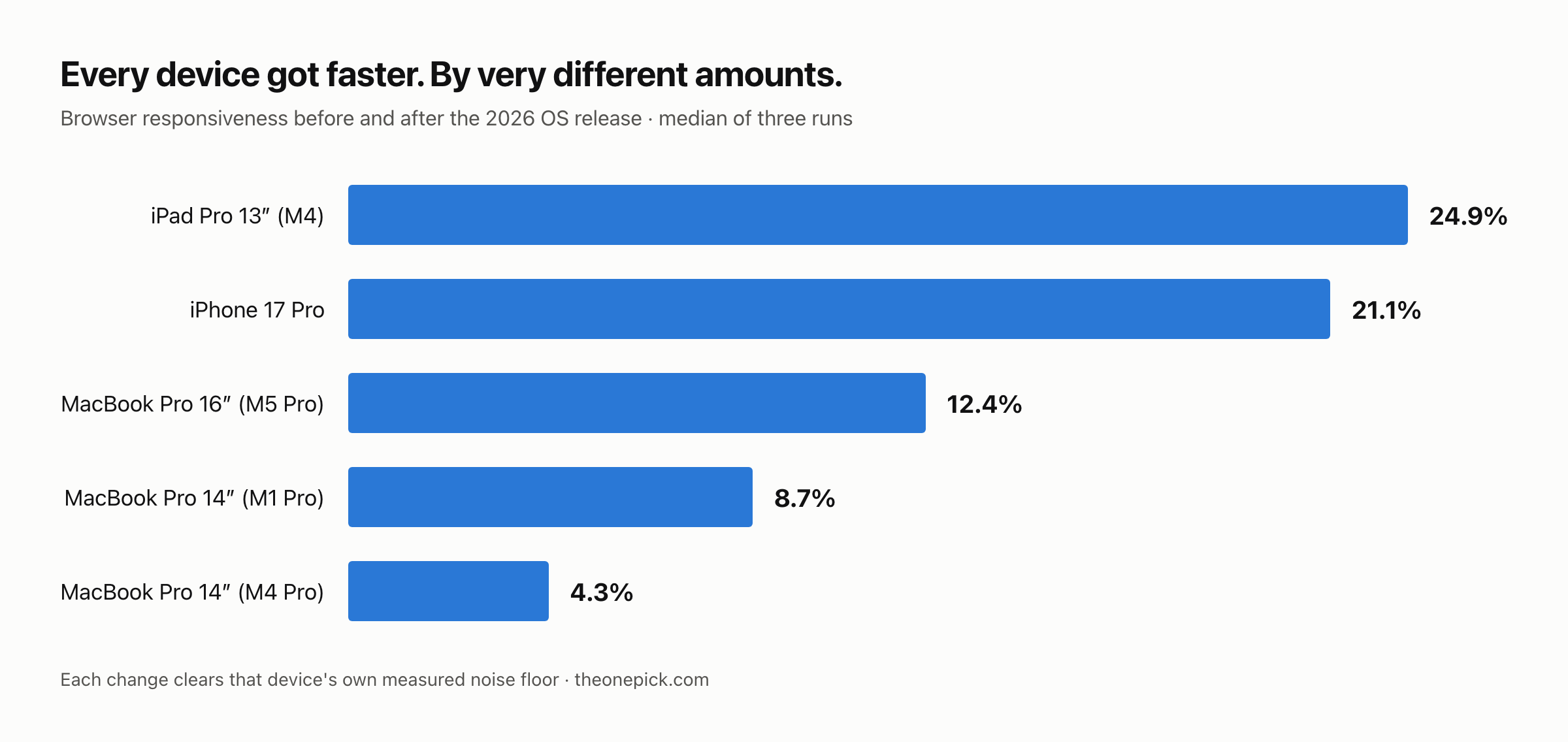
Apple says its 2026 software release makes things faster. We had five Apple devices with measured performance baselines from the week before the update, so we updated them and measured again. All five got faster — by between 4.3% and 24.9%.
That spread is the part worth your attention. “Faster” is not one number, and on our hardware the same update delivered a barely-noticeable gain to one machine and a transformative one to another.
What we measured
Speedometer 3.1 in Safari, three runs per device, median reported. We took a baseline on each device before updating, recorded the run-to-run spread, and used that spread to decide in advance how large a change would have to be before we called it real.
| Device | Before | After | Change | Our noise floor |
|---|---|---|---|---|
| iPad Pro 13″ (M4) | 40.9 | 51.1 | +24.9% | 1.2% |
| iPhone 17 Pro | 43.2 | 52.3 | +21.1% | 5.3% |
| MacBook Pro 16″ (M5 Pro) | 55.0 | 61.8 | +12.4% | 2.7% |
| MacBook Pro 14″ (M1 Pro) | 35.65 | 38.76 | +8.7% | 2.0% |
| MacBook Pro 14″ (M4 Pro) | 51.2 | 53.4 | +4.3% | 3.1% |
Higher is better. Every change clears its own device’s noise floor, which is the bar we set before seeing any results.
Three operating systems are in that table — iOS 27, iPadOS 27 and macOS 27 — across hardware spanning 2021 to 2026. We expected at least one device to show nothing. None did.
The oldest machine is not the biggest winner
The common framing around these releases is that old hardware benefits most. Our 2021 MacBook Pro gained 8.7%, which is real and useful. But a 2024 iPad Pro gained 24.9% — nearly three times as much — and a 2024 MacBook Pro gained 4.3%, the smallest result in our set.
Two devices from the same year sit at opposite ends of our table. Whatever drives the size of the gain, it is not simply how old the machine is.
We do not know what does drive it. Plausible factors we did not isolate: the iPad started from a lower version (26.6.1 against 26.6.2 on the Macs), the tablet has different thermal behaviour from a laptop, and Safari on iPadOS is a different build from Safari on macOS. We measured the outcome, not the mechanism.
What Apple actually claimed, and what we did not test
Apple’s own material points at specific improvements: app launch times, how quickly photos load in the library, AirDrop speed. Those are system-level operations.
We did not measure any of them. We measured browser responsiveness, which is a different thing. Our numbers cannot confirm or refute a claim about app launch times.
What our numbers do is sit in the same direction. If the release improved the kind of work a browser does — script execution, layout, DOM handling — that is consistent with a release that improved system-level responsiveness generally. It is supporting evidence, not verification, and we would rather say that plainly than let a headline imply we checked Apple’s homework.
There is also a category where we measured the opposite. On the Macs, raw computation — compression and video encoding — got slower or stayed flat on the same machines and in the same sessions where the browser got faster. We wrote that up separately because it is the more surprising result.
The iPhone half of this, written as a decision rather than a measurement, is here: should you update your iPhone 17 to iOS 27.
We measured during the window everyone tells you to skip
Standard advice after a major update is to wait several days before judging performance, because the device is busy reindexing in the background. The recommended wait varies by source: 24 to 48 hours in some coverage, 48 to 72 in others, three to five days elsewhere.
We measured inside that window deliberately — and on the iPhone we went back and measured twice more.
The iPhone’s first reading came 1 hour 54 minutes after its update finished. The M1 Pro was measured while its reindexing processes were consuming a median of 25.7% of CPU — we captured that figure during the run rather than assuming it.
Both were faster than their baselines even then. On a machine actively giving up a quarter of its processor to background work, browser performance still improved 8.7%.
But the iPhone did not stop there:
| Time since update | Median | vs baseline 43.2 |
|---|---|---|
| 1 hour 54 minutes | 47.3 | +9.5% |
| 24 hours | 52.3 | +21.1% |
| 48 hours | 54.5 | +26.2% |
The reading taken during reindexing captured about a third of the eventual gain. The figure in our main table is the 24-hour one — later than the first reading, because that is what a settled device gives, and earlier than the 48-hour one, because we have not established that the climb has stopped. We have written up the reindexing window separately.
Common questions
Does the 2026 update actually make devices faster?
On browser performance, yes, on all five devices we own. The gains ranged from +8.7% on a four-year-old MacBook Pro to +26.2% on an iPhone 17 Pro. Compute performance is a separate question and it did not move the same way.
Should I wait before updating?
Not for performance reasons, but do wait before judging it. Every device was still re-indexing for about 72 hours afterwards, and a measurement taken inside that window understates the gain badly — on our iPhone it showed a third of the real figure.
Will the update slow down my older device?
It did not slow down the oldest machines we own. The four-year-old MacBook Pro and the 2022 iPhone both gained. The pattern that old hardware is deliberately slowed by updates did not appear in anything we measured.
Where our numbers are weak
- One unit of each device. Five devices is not a sample. Manufacturing variation, thermal paste, battery condition and installed software all differ between units, and we have no way to separate those from the update.
- We did not record whether the iPhone was charging during its baseline runs. That is our error, not a judgement call. We measured the M1 Pro on mains and on battery separately and found under 1.2% difference, so we do not think it moved the result — but we cannot prove it for the iPhone.
- The M4 Pro was noisy. Its compute measurements after the update swung 9.5% between two sessions on the same day, with spreads up to 15%. Its browser numbers were stable, so we report those; the compute figures for that machine we treat as unmeasurable rather than pretending otherwise.
- We measured one benchmark. Speedometer approximates browser responsiveness. It says nothing about battery life, camera processing, or anything else you might care about.
How to check your own device
Open browserbench.org in Safari and run Speedometer 3.1. It takes a few minutes and installs nothing.
The catch is that a single number afterwards tells you very little, because you have nothing to compare it against. The useful move is to run it before your next major update, three times, two minutes apart, and write the numbers down. Then run it again after. That is all we did.
On a Mac you can confirm the machine is in a comparable state before each run:
sysctl -n vm.loadavg
ps -Aceo pcpu,comm -r | head -5
Two conditions matter if you want the comparison to hold: keep the power state the same both times, and keep roughly the same applications open. On one of our Macs, leaving a browser and a virtual machine running shifted a benchmark by 20% — enough to make a newer machine look slower than an older one.
Update, 18 September 2026. The iPhone 17 Pro figure in the table above was originally +9.5%, from a reading taken 1 hour 54 minutes after the update. Two later sessions on the same phone, at 24 and 48 hours, returned +21.1% and +26.2%. The table now carries the 24-hour figure and the row has moved accordingly. No other device’s numbers have changed.
Measured 14-18 September 2026. Devices: iPhone 17 Pro (iOS 26.6.2 → 27.0), iPad Pro 13-inch M4 (iPadOS 26.6.1 → 27.0), MacBook Pro 16-inch M5 Pro, MacBook Pro 14-inch M4 Pro (both macOS 26.6.2 → 27.0 build 26A428), MacBook Pro 14-inch M1 Pro (macOS 26.5.1 → 27.0). Speedometer 3.1 in Safari, three runs each, median reported.
Three of these five devices are Macs, and we measured their compute performance too. See how the three generations compare.